


ISO 27001 Statement of Applicability Explained: A Practical Guide
An ISO 27001 audit can go off track quickly when an organization cannot explain which security controls it uses, which ones it does not use, and why. That is exactly the problem the SoA solves.
The SoA is one of the most important documents in an Information Security Management System, often called an ISMS. It connects risk assessment, risk treatment, security controls, and audit evidence in one place. For many organizations, it becomes the practical map of their ISO 27001 security program.
This guide explains what the SoA is, why it matters, what it should include, and how to build one without making it harder than it needs to be.

What the SoA is and why it matters
The SoA is a formal document that lists the information security controls relevant to an organization’s ISMS. It explains which controls apply, which controls do not apply, and the reason behind each decision.
In simple terms, the ISO 27001 Statement of Applicability answers four practical questions:
Which security controls has the organization selected?
Why were those controls selected?
Are the selected controls currently implemented?
If any Annex A controls are excluded, why are they excluded?
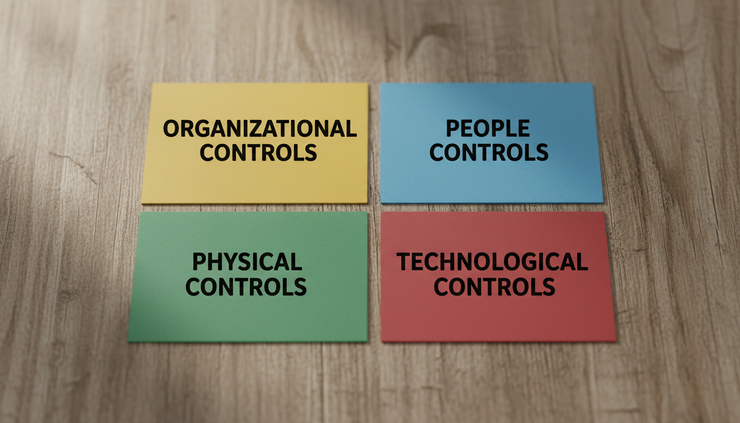
ISO 27001 includes Annex A as a reference set of security controls. In ISO 27001:2022, Annex A contains 93 controls grouped into four themes:
Organizational controls
People controls
Physical controls
Technological controls
An organization does not automatically apply every control in the same way. The SoA shows how the organization has reviewed these controls and made decisions based on its risks, legal obligations, business needs, and security goals.
For example, a software company that stores customer data in cloud platforms may need strong controls for access management, backups, secure development, and supplier relationships. A small manufacturing business may focus more on physical security, equipment protection, network access, and continuity planning.
Both organizations can pursue ISO 27001 certification, but their SoA documents should not look identical. The SoA should reflect the real business, not a copied template.
A good SoA is not just a list of controls. It is a reasoned record of security decisions.
ISO 27001 Statement of Applicability fits into ISO 27001
The SoA sits between risk management and security control implementation. It proves that the organization has not chosen controls at random.
A typical ISO 27001 flow looks like this:
Define the scope of the ISMS.
Identify information assets and risks.
Assess those risks.
Decide how to treat the risks.
Select suitable controls.
Record those decisions in the SoA.
Implement and maintain the controls.
Review performance and improve over time.
The SoA is especially important because ISO 27001 requires organizations to determine necessary controls as part of risk treatment. Annex A is used to check that no important controls have been missed.
This means the SoA should not be created before the risk assessment. If it is, the organization may end up with a generic document that does not match its actual risk profile.
ISO 27001 Statement of Applicability supports internal decisions
The SoA helps management understand what the organization is doing to protect information. It also helps teams see which controls apply to their work.
For example, if access control is included in the SoA, the organization should be able to show how user access is approved, reviewed, changed, and removed. If supplier security is included, the organization should be able to show how supplier risks are assessed and managed.
The SoA makes these expectations visible.
The SoA supports audits
During an ISO 27001 audit, an auditor may use the SoA to understand the organization’s control environment. The auditor may ask why a control is included, why another is excluded, or how an implemented control works in practice.
The SoA does not need to contain every policy, procedure, or record. But it should point clearly to the organization’s decisions and implementation status.
What a practical SoA should include
A useful SoA should be clear enough for management, auditors, and control owners to understand. It does not need to be written in complex language.
Most SoA documents include the following elements.
SoA element | What it means | Practical example |
Control reference | The Annex A control identifier or internal control ID | A.5.15 Access control |
Control name | The name or short description of the control | Access rights must be managed |
Applicability | Whether the control applies | Applicable or not applicable |
Justification | The reason for including or excluding the control | Required due to customer data access risk |
Implementation status | Whether the control is implemented | Implemented, partially implemented, or planned |
Related documents | Evidence or supporting materials | Access control policy, user access review record |
The format can be a spreadsheet, document, or governance tool. What matters is that it is controlled, accurate, and easy to review.
Applicability decisions
For each Annex A control, the organization should explain whether it applies. This decision should come from the risk assessment, legal and regulatory needs, contractual commitments, and business context.
A control may apply because it reduces an identified risk. It may also apply because a customer contract or legal requirement expects it.
For example:
Encryption may apply because sensitive customer data is stored or transmitted.
Background checks may apply for roles with access to sensitive information, within legal and HR boundaries.
Physical access controls may apply where servers, devices, or paper records need protection.
Justification for inclusion
When a control applies, the SoA should explain why. The reason does not need to be long, but it should be meaningful.
Weak justification:
“Control is required.”
Better justification:
“Control is selected to reduce unauthorized access risk to customer systems and internal applications.”
The second version is better because it connects the control to a real risk.
Justification for exclusion
Some organizations assume that excluding a control looks bad. That is not always true. ISO 27001 allows controls to be excluded when the organization can justify the decision.
The key is that the reason must be valid.
For example, a control related to physical delivery of information may not apply if the organization does not use physical delivery channels for sensitive information. The SoA should explain that clearly.
Poor exclusion reason:
“Not needed.”
Better exclusion reason:
“The organization does not transfer sensitive information using physical delivery services. Information exchange occurs through approved digital channels covered by separate controls.”
A strong exclusion shows that the organization reviewed the control and made a conscious decision.
Implementation status
A SoA should also show whether each selected control is implemented. This avoids confusion during audits and management reviews.
Common status labels include:
Implemented
Partially implemented
Planned
Not yet implemented
If a control is planned or partially implemented, the organization should track the work through a risk treatment plan, project plan, or improvement action.
The SoA should not pretend unfinished controls are complete. Auditors expect honest status reporting supported by evidence.
How to create and maintain the SoA
The SoA is easier to build when the organization follows a clear process. It should grow from real risk work, not from copying another company’s document.
Start with the ISMS scope
The scope defines what the ISMS covers. It may include the whole organization or selected services, locations, systems, and processes.
A clear scope prevents the SoA from becoming too broad or too vague. If the ISMS covers a cloud-based customer platform, the SoA should focus on the risks and controls relevant to that platform and the teams that support it.
If the scope is unclear, the SoA becomes unclear too.
Use the risk assessment results
The risk assessment identifies what could go wrong, how serious it could be, and which risks need treatment.
Common risks include:
Unauthorized access to systems
Loss of sensitive data
Service downtime
Malware infection
Supplier failure
Human error
Poor change control
Once risks are assessed, the organization decides how to treat them. Controls are then selected to reduce or manage those risks.
This is where the SoA becomes useful. It records the controls chosen and explains the reasoning.
Compare selected controls with Annex A
After selecting controls from the risk treatment process, compare them against Annex A. This helps confirm whether any relevant control areas were missed.
This step is not about blindly adopting every Annex A control. It is about checking completeness.
For example, the risk assessment may identify access control and backup risks, but the Annex A review may remind the team to consider supplier security, information classification, or logging.
Keep the language simple
A SoA should be clear enough for non-specialists to understand. Avoid long explanations unless they are needed.
A practical justification might say:
“Selected to reduce the risk of unauthorized access to customer information.”
That is better than a long technical paragraph that hides the point.
Assign responsibility
Each applicable control should have an owner or responsible function. This may not always appear directly in the SoA, but the organization should know who manages each control.
Examples include:
IT manages technical access controls.
HR supports screening, onboarding, and awareness activities.
Facilities manages physical access controls.
Procurement or vendor management supports supplier controls.
Management approves risk treatment decisions.
Clear ownership prevents the SoA from becoming a document that no one maintains.
Review the SoA regularly
The SoA should be reviewed when risks, systems, processes, or legal obligations change. It should also be reviewed as part of normal ISMS activities.
Common triggers include:
New systems or services
Major technology changes
New suppliers
Business restructuring
Security incidents
New customer or regulatory requirements
Internal or external audit findings
A SoA that is not updated can quickly become misleading.
Common SoA mistakes to avoid
Many SoA problems come from treating the document as a formality. That approach creates audit risk and weakens the ISMS.
Copying a template without adapting it
Templates can help with structure, but they cannot make risk decisions for the organization. A copied SoA often includes controls that do not match the business or excludes controls without proper reasoning.
A template should be a starting point, not the final answer.
Marking every control as applicable
Some organizations mark every Annex A control as applicable to avoid explaining exclusions. This can create more work than necessary. If a control is marked applicable, auditors may expect evidence that it has been implemented.
Controls should be selected because they are needed, not because it feels safer to include everything.
Excluding controls without a clear reason
Exclusions need clear, defensible explanations. A short reason is fine, but it must make sense.
If an organization excludes a control that appears relevant to its risks, an auditor may ask for more detail. Poor explanations can suggest that the risk assessment was incomplete.
Letting the SoA drift away from reality
The SoA should match what the organization actually does. If it says access reviews happen quarterly, the organization should have records showing those reviews.
If the process changes, update the SoA or related documents. A mismatch between documentation and practice is a common audit issue.
Ignoring partially implemented controls
It is acceptable to show that a control is partially implemented, especially during an implementation project. The problem comes when the status is unclear or overstated.
If work remains, track it. Assign an owner, define the next step, and keep evidence of progress.
What auditors usually look for
Auditors do not expect every organization to have the same SoA. They look for a logical connection between scope, risk assessment, risk treatment, controls, and evidence.
They may check whether:
The SoA includes the required applicability decisions.
Justifications are clear and reasonable.
Exclusions are explained.
Implementation status is accurate.
Selected controls match identified risks.
Evidence supports the controls marked as implemented.
The SoA is reviewed and maintained.
The best preparation is simple: make sure the document tells the truth, matches the risk assessment, and reflects current practice.
A well-prepared SoA also helps internal teams. It reduces confusion about what has been implemented and what still needs work.
If you need help building or reviewing your SoA for certification readiness, you can get practical ISO 27001 support here.
Frequently asked questions
Is the SoA mandatory for ISO 27001?
Yes. The SoA is a required part of ISO 27001. It records the organization’s control decisions, including what applies, what does not apply, and why.
Does every Annex A control need to be implemented?
No. Annex A controls must be reviewed, but not every control needs to be implemented. If a control is excluded, the organization must provide a valid justification.
Can a small business create a simple SoA?
Yes. A small organization can use a simple format as long as it covers the required information. Clear reasoning and accurate status matter more than document size.
How often should the SoA be reviewed?
Review it during planned ISMS reviews and whenever major changes occur. Changes to systems, suppliers, services, risks, or legal requirements may all affect the SoA.
Who should own the SoA?
The ISMS manager, compliance lead, or information security lead often owns the document. Control owners from IT, HR, facilities, procurement, and management should support it where relevant.
The SoA turns ISO 27001 decisions into a clear record
The SoA is one of the most useful documents in an ISO 27001 management system. It shows how the organization selected controls, why those controls matter, and whether they are in place.
A strong SoA is clear, honest, and connected to risk. It does not need to be complicated. It needs to reflect the organization’s real security decisions.
Start with scope. Use the risk assessment. Review Annex A carefully. Record clear justifications. Keep the document current. Those steps will make the SoA more useful for management, easier for teams to follow, and stronger during audits.

Comments